AI Copilot Development Services

MindInventory builds AI copilots that work inside the software your team already uses, suggesting the next step, showing why, and leaving every decision with a person. Our AI engineers, data scientists, and MLOps specialists build copilots that fit existing screens and permissions. From healthcare and finance to enterprise operations, our copilots connect with your data, tools, and systems to assist teams without disrupting how they work.

Trusted By Global Clients, Including Fortune 500 Companies

Week 2

A written copilot plan: which screens it lives in, which tasks it helps with, and a fixed estimate

Before the build

Clickable high-fidelity wireframes of the copilot inside your real screens, tested with real users

At launch

A copilot that works under each user's existing login and permissions

At handover

All code, prompts, and usage dashboards, owned by you

70+

AI and ML specialists

300+

Engineering specialists

2700+

Projects delivered

1800+

Clients served

15+

Years in business

ISO 42001: 2023

ISO 42001: 2023

ISO 27001: 2022

ISO 27001: 2022

SOC2 Type II

SOC2 Type II

HIPAA

HIPAA

BAAs Signed

BAAs Signed

AI Copilot Development Services We Deliver

MindInventory builds AI copilots around the way your business actually works: not as standalone chat windows, but as layers connected to your applications, enterprise data, APIs, and business processes. We combine LLMs, RAG, GraphRAG, AI agents, workflow automation, and secure system integrations so each copilot understands context, retrieves trusted information, takes guided actions, and keeps people in control.

AI Copilot Consulting icon

AI Copilot Consulting

AI copilot consulting decides where a copilot will save time before anything is built. MindInventory watches how your team works today, measures where time goes, checks which systems hold the data, and confirms each host platform allows extensions. You get a written copilot plan naming the screens, tasks, model and retrieval approach, and a fixed estimate, starting with the free two-week AI Feasibility Assessment. Strategy across several AI use cases sits with our AI consulting services.

Embedded AI Assistants and AI Copilot Integration icon

Embedded AI Assistants and AI Copilot Integration

Most teams live in a few systems: an EHR, a CRM, a ticketing tool, an ERP. MindInventory integrates copilots into those screens through supported extension points, such as SMART on FHIR apps, Salesforce Lightning components, and Microsoft 365 add-ins, and connects them to the APIs and records behind them. The assistant reads the record already open, so nobody copies data into a separate AI tool.

In-Product AI for Your SaaS Customers icon

In-Product AI for Your SaaS Customers

For SaaS companies, the copilot is a feature of your product. MindInventory keeps each customer’s data separate on the server, meters usage per account so cost stays visible, and releases features behind flags to a few accounts first. Suggestions use your product’s design language, so the copilot reads as part of your product, not a bolt-on widget.

Copilot UX That People Trust and Use icon

Copilot UX That People Trust and Use

A copilot fails when people ignore it, so the interface matters as much as the model. MindInventory designs around three moments: when a suggestion appears, how the user judges it, and what one click does with it. We test clickable high-fidelity wireframes with real users before the build, because placement and timing decide adoption more than model choice does.

Copilot Permissions, Actions, and Feedback icon

Copilot Permissions, Actions, and Feedback

A copilot acts as the user, never as a shared account, so it sees and suggests only what that user may. MindInventory separates read-only help, such as summaries and drafts, from actions that change records, and every record change needs the user’s confirmation. Each accept, edit, and dismissal is logged.

AI Copilot Maintenance and Optimization icon

AI Copilot Maintenance and Optimization

A copilot keeps its place only if someone watches how it is used. MindInventory tracks every workflow against the Copilot Adoption Scorecard and rechecks integrations after each host-system or model update. When suggestions miss, we fix prompts and source data first, and fine-tune on user corrections only when the new model beats the current one on your test set. Your data trains only your copilot.


How We Scope a Copilot Request

A copilot request is one of six jobs, and each needs a different design. MindInventory sorts yours before the build. If the work needs no person in the loop, you need an agent, not a copilot.

The job
Example request
What it needs
Prepare
"Summarize this patient before I walk in"
Read access to the open record, prepared when it opens
Draft
"Write the reply to this ticket"
A draft in the user's editor, never sent unseen
Check
"Flag what is missing from this claim"
Rules plus model checks, shown inline
Suggest
"What should I do next with this account?"
Ranked options, each with its reason
Act on confirm
"Move the deal stage and log the call"
Actions under the user's permissions, one-click confirm
Run unattended
"Process every new ticket overnight"
Not a copilot: an agent or process automation

AI Copilots We Have Built

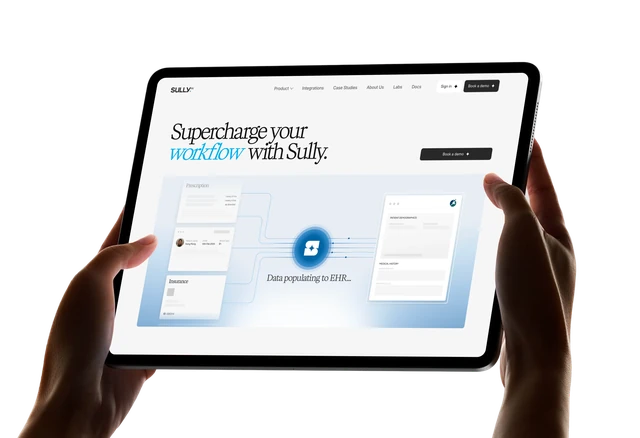
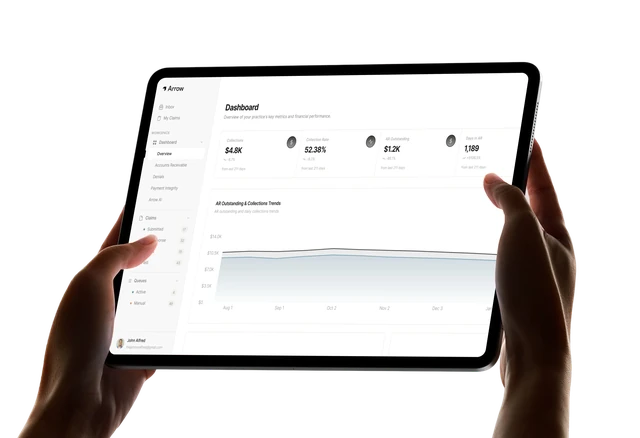
Both projects put a copilot inside software that licensed professionals cannot leave, and both keep every decision with a person.

Sully AI - Clinical Copilot and AI Workforce

A US healthcare SaaS company wanted to give clinicians a team of AI colleagues, not one more tool to open. We built six agents, covering reception, triage, scribing, clinical consultation, medical coding and care coordination, with an orchestration layer that decides which one handles a given task. It integrates natively with Epic and athenahealth and was built HIPAA-ready throughout.

Outcomes:

  • 12.5M+ minutes of clinical documentation automated
  • Twice the workload per provider, without additional hours
  • Epic and athenahealth native integration, embedded in Epic Haiku
Read Case Study

Arrow: A Co-Pilot for Medical Billers

Billers were already overloaded, so another dashboard would have added work, and claims could not be handed to black-box automation. MindInventory built Arrow as a co-pilot for billers rather than a controlling system. For each denied claim it finds the likely root cause, drafts the fix and the appeal package, and ranks the queue by dollar value, age, and recovery chance. The biller approves every action. Arrow reports these results for its platform as a whole.

Outcomes:

  • 85% fewer claim denials
  • 45 to 18 accounts receivable days
  • 1.5B+ claims processed through the platform
Read Case Study

Want a Copilot Inside a System Your Team Can't Leave?

Tell MindInventory which screens and tasks your team spends the most time on. In two weeks, free of charge, you get a written copilot plan, where it should live, and a fixed estimate. If your vendor’s built-in copilot already covers the need, the plan says so.

Humanoid robot beside a team pointing at a laptop dashboard in a bright office

What an AI Copilot Changes for Your Team

MindInventory’s copilots take the preparation off your team’s plate, the searching, drafting, and cross-checking, while people keep the judgment.
What you get
Green checkmark icon

A copilot inside the screens your team already uses, so nobody switches tools to use it.

Green checkmark icon

Suggestions that explain themselves. Each one shows its reason or source, so people can judge it in seconds.

Green checkmark icon

Every decision stays with a person. Anything that changes a record waits for the user's confirmation.

Green checkmark icon

Usage you can see. Dashboards show where the copilot is accepted, edited, or ignored.

Green checkmark icon

Ownership of everything we build. Code, prompts, design files, and dashboards transfer at handover. Your data never trains models for anyone else.

Where you are now
Where you are after launch

Staff copy records into a separate AI tool and paste answers back.

The copilot reads the record already on screen and suggests in place.

Our AI pilot gave answers nobody trusted, so nobody used it.

Each suggestion shows why it was made, and one click accepts or edits it.

We worry the AI will change records on its own.

The copilot drafts and suggests; a person confirms every change.

We can't tell whether the AI feature is worth what it costs.

Acceptance, edits, and time saved are tracked per workflow from launch.

Customers keep asking when our product will have AI.

An in-product copilot ships to a few accounts first, then to everyone.

The MindInventory Copilot Design Rules

Every MindInventory copilot must pass six design rules before launch. They are the difference between a copilot people use every day and one they switch off after a week.

Rule 1

Suggest in place

What the User Sees

Help appears in the screen where the work happens

What Goes Wrong Without It

People switch tabs, then stop switching

Rule 2

Show the why

What the User Sees

Each suggestion shows its reason or source

What Goes Wrong Without It

People cannot judge suggestions, so they ignore them

Rule 3

One click to act

What the User Sees

Accept, edit, or dismiss in a single step

What Goes Wrong Without It

Using the copilot takes longer than doing the task

Rule 4

Act as the user

What the User Sees

The copilot sees only what the user can see

What Goes Wrong Without It

Data appears that the user should never have reached

Rule 5

Confirm before changing

What the User Sees

Any record change waits for the user's approval

What Goes Wrong Without It

The copilot changes something nobody intended

Rule 6

Learn from every response

What the User Sees

Accepts, edits, and dismissals are tracked

What Goes Wrong Without It

Nobody knows whether the copilot is helping

Built a Copilot That Nobody Uses?

Low adoption usually comes from placement, trust, or speed rather than the model. MindInventory reviews your copilot in five working days, free, against the six design rules, and sends a findings document naming what is holding usage back and what fixing it takes.

Small AI robot beside hands typing code on a laptop

Our AI Copilot Development Process

MindInventory builds AI copilots in six stages, designing the experience with real users before any model work and measuring adoption from the first pilot. A focused copilot for one workflow typically reaches production in 8 to 14 weeks.

  1. Step 1

    Workflow Observation and Task Selection

    We watch how people work today, time each step, and pick the tasks where preparation, searching, or drafting costs the most time.

    You receive: a task map, the chosen tasks, and baseline times

    Typical time: 1 to 2 weeks

    Moves on when: the first tasks and their success measures are agreed

  2. Step 2

    Copilot UX Design and High-Fidelity Wireframes

    We design where each suggestion appears and what one click does, then test clickable high-fidelity wireframes with five to eight real users.

    You receive: tested high-fidelity wireframes

    Typical time: about 2 weeks

    Moves on when: test users finish the task faster with the copilot than without it

  3. Step 3

    Host Integration, Context, and Permissions

    We build into the host system's extension point, read the record already open, and act under the user's own token. Vendor approval is submitted here.

    You receive: the copilot running in the host sandbox

    Typical time: 2 to 3 weeks

    Moves on when: context and permission test cases pass

  4. Step 4

    Model, Prompt, and Latency Engineering

    We route each task to the right model and build an evaluation set from real records. Inline suggestions target about a second; longer drafts stream.

    You receive: the suggestion service with its evaluation set

    Typical time: 2 to 3 weeks

    Moves on when: quality and latency targets are met

  5. Step 5

    Pilot With Real Users

    We release to a pilot group behind feature flags and track every suggestion against the Adoption Scorecard.

    You receive: a pilot report on adoption and time saved

    Typical time: about 2 weeks

    Moves on when: acceptance reaches the agreed target

  6. Step 6

    Rollout and Continuous Improvement

    We roll out team by team or account by account, and feed user edits back into prompts and source data.

    You receive: dashboards and full handover of code, prompts, and designs

    Typical time: 1 to 2 weeks, then ongoing

    Moves on when: handover is signed off

How Long Does It Take to Build an AI Copilot?

A proof of concept in one screen takes 6 to 10 weeks, and a focused copilot for one workflow takes 8 to 14 weeks. A production copilot across several workflows, or in-product AI for every customer, takes 4 to 8 months. Host-system approvals and user testing usually set the pace, not the model. The six stages are set out in Our AI Copilot Development Process above.

 Blue gradient background

Know What Your AI Copilot Will Cost

Tell us the workflow and the system it lives in. Within two weeks MindInventory returns a fixed estimate, where the copilot should sit, and a written recommendation, free of charge.

Get my fixed estimate

The AI Copilot Stack We Build On

MindInventory builds each copilot from three core parts: the host system’s extension points, a front end that streams suggestions directly into the user’s screen, and a model layer operating behind a secure gateway. As part of our AI Consulting Services, we help clients choose the right architecture, integrations, and model strategy for each use case. Each layer can evolve independently, so model upgrades or changes don’t require redesigning the screens your team already uses.

Host extension points
SMART on FHIR apps Salesforce Lightning components Microsoft 365 add-ins Microsoft Teams apps
Front end and streaming
React Next.js Vercel AI SDK CopilotKit server-sent event WebSockets
Design and user testing
Figma clickable high-fidelity wireframes moderated user testing
Model gateways
LiteLLM Portkey OpenRouter
Frontier models
Claude GPT Gemini Grok
Open-weight models
Llama Mistral DeepSeek Qwen Gemma Phi
Tools and interoperability
MCP function calling RBAC structured output
Retrieval
LangChain LlamaIndex GraphRAG hybrid search reranking
Feature flags and usage analytics
LaunchDarkly PostHog Mixpanel Amplitude
Evaluation
Ragas DeepEval Promptfoo Braintrust LangSmith
Observability
Langfuse Arize Phoenix Helicone OpenTelemetry Datadog

AI Copilots We Build for Real-World Workflows

MindInventory builds AI copilots inside the systems where professionals already work, helping them prepare information, summarize records, draft work, and get relevant next-step suggestions without switching tools. Our work spans healthcare, SaaS, financial services, customer support, sales, and operations.

Our copilots support clinicians across the workflow by handling documentation, triage, coding, and care coordination tasks while keeping providers in the review loop. For Sully AI, MindInventory integrated this assistance into Epic and athenahealth workflows.
We embed copilots directly into SaaS products so customers can draft, summarize, search, and receive contextual suggestions using their own account data, with appropriate data separation between customers.
We build copilots that help teams prepare cases, review documents, summarize records, and surface relevant next steps within CRM and case-management workflows.
We build copilots inside ticketing systems to summarize customer history, draft replies, and surface relevant knowledge while keeping agents in their existing workflow.
We build copilots that prepare account briefs, draft follow-ups, surface relevant account information, and suggest CRM updates for sales and operations teams.

Custom Copilot, Standalone Assistant, or Built-In?

MindInventory recommends the option that gets used, not the biggest build. If a vendor’s built-in copilot covers the need, start there; build custom when the work is specific to your business or your product.

Custom embedded copilot
Standalone AI assistant
Vendor's built-in copilot
Where it lives
Inside your system's screens
In a separate app or tab
Inside the vendor's product
Best when
The workflow is specific to your business or product
People need open-ended help across many tools
The task is generic and the vendor covers it
Watch out for
Host-system approvals and release cycles
Copying data in and out, which hurts adoption
Limited control over data, behavior, and cost
Build and upkeep
Highest, fully yours
Moderate
Lowest, licensed per seat

When an AI Copilot Isn’t the Right Fit For You?

Do you want AI to complete the work? If the system needs to handle tasks, make decisions, and move through a workflow with limited human intervention, consider: AI agent development

Do you want AI to answer from your information? If the system needs to retrieve relevant information from your documents or internal knowledge before responding, consider: RAG development

Do you want AI to work inside your existing software? If the goal is to add AI capabilities to your current application, APIs, or business workflows, consider: AI integration services

It Is Also Not Right Fit If

  • Your vendor's built-in copilot already covers the task
  • The task takes people a few seconds today, so a copilot cannot save meaningful time
  • Nobody owns the workflow the copilot is meant to help
  • You want the cheapest build on a three-week timeline, with no user testing
  • Nobody owns a business metric the copilot is meant to move

Not Sure a Copilot Is the Right Build?

Tell MindInventory the task and the system it happens in. In two weeks, free, you get a written recommendation: a custom copilot, your vendor’s built-in one, an agent, or no AI at all, with a fixed estimate for the one that fits.

Small humanoid robot sitting at a desk beside a computer monitor

Why Choose MindInventory as Your AI Copilot Development Company

MindInventory has built software since 2011, and its 70+ AI engineers, data scientists, and MLOps specialists work alongside UX designers inside a 300+ person engineering organization.
Design and AI in one team icon

Design and AI in one team

The people who design the copilot’s screens work with the people who build the model behind it.
Built for high-stakes work icon

Built for high-stakes work

Our copilots run where a licensed professional signs off, as on Sully AI and Arrow.
Permissions stay where they are icon

Permissions stay where they are

The copilot acts as the user, never as a shared account.
You keep everything icon

You keep everything

Code, prompts, design files, and dashboards transfer at handover.

Plan Your Copilot, or Fix One Nobody Uses

Starting fresh? MindInventory assesses one workflow in two weeks and returns a copilot plan with a fixed estimate. Already have a copilot people ignore? We review it in five working days and tell you what is holding usage back. Both are free.

Two colleagues laughing and pointing at a humanoid robot beside their desk

AI Copilot Development FAQs

A copilot works inside the software people already use and helps with the task in front of them. A chatbot is a separate conversation window that answers questions. A copilot knows which record is open and suggests the next step there; a chatbot needs the user to explain the context first. Many products start with a chatbot and move to a copilot once they see where users actually need help.

Both, with a clear line between them. MindInventory lets copilots draft, summarize, and suggest freely, and makes any action that changes a record wait for the user’s confirmation. Each action runs under the user’s own permissions and is logged. If the work should happen with no person in each step, that is an agent rather than a copilot.

Yes, through each platform’s supported extension points. For Epic and most EHRs that means SMART on FHIR apps and the vendor’s app marketplace, as on Sully AI’s embedding in Epic Haiku. Salesforce supports custom Lightning components and Microsoft 365 supports add-ins. Vendor approval can take weeks, so MindInventory starts that process at the beginning of the project.

Fast enough that waiting is never slower than doing the task. On MindInventory builds, short inline suggestions aim to appear within about a second, and longer drafts stream so the first words show immediately. Where possible, the copilot prepares suggestions before the user asks, for example when a record opens, so help is ready when it is needed.

The user sees it and fixes it before anything changes. Because every suggestion shows its reason and waits for a click, a wrong suggestion costs a few seconds rather than a bad record. Every edit and dismissal is logged, so MindInventory can see which suggestions miss most often and fix the prompts, data, or rules behind them.

By tracking every suggestion. MindInventory dashboards show how often suggestions are accepted, edited, or dismissed, broken down by task and team, along with time saved per task. A copilot with low acceptance usually has a placement or trust problem, which shows up in these numbers before it shows up in complaints.

Yes. Each time a user edits a suggestion, the original and the corrected version are stored. MindInventory uses that history to improve prompts and source data first, and, once there are enough examples, to fine-tune a model on your own corrections. Your data is used only for your copilot and never trains models for anyone else.

Very little, if it is designed well. Because the copilot appears in screens people already know and every suggestion needs one click, most users learn it on the job. MindInventory adds short in-product hints at launch and watches usage data in the first weeks to find where people hesitate.

Yes, and it is one of the most common requests. MindInventory builds the copilot as a feature of your product, keeps each customer’s data separate on the server, meters usage per account so you can price it, and releases it to a few accounts first. Your customers see your brand and design, not a third-party widget.
RELATED SERVICES

Explore our other related services to enhance the performance of your digital product

AI Insights From Our Engineering Team
Written by the people doing the work, for the questions that come up before a project starts.