AI Video Analytics Solutions

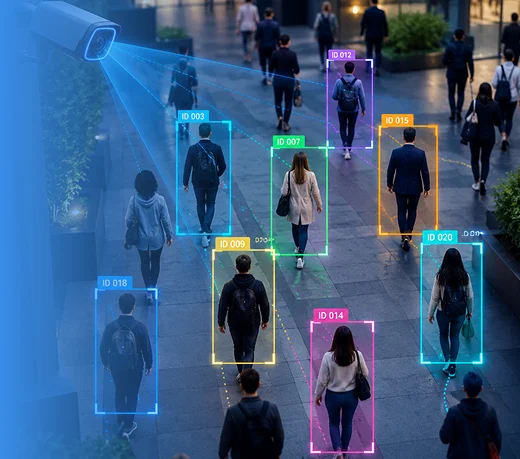
MindInventory builds AI video analytics that watches your camera, drone, and robot feeds for the events that matter: unsafe behavior, equipment anomalies, missed process steps, and manipulated footage, then alerts the right person with the clip attached. Our 70+ AI engineers, data scientists, and MLOps specialists build on the cameras and video systems you already run.

Trusted By Global Clients, Including Fortune 500 Companies

Week 2

A written plan: the events to detect, which cameras, how often to analyze frames, cost per stream, and a fixed estimate

Before go-live

An agreed limit on missed events and false alarms for each event type, tested on your recorded footage

At launch

Alerts in the tools your team already uses, each with the clip, camera, and timestamp

At handover

Models, video pipelines, and dashboards, owned by you

70+

AI and ML specialists

300+

Engineering specialists

2700+

Projects delivered

1800+

Clients served

15+

Years in business

ISO 42001: 2023

ISO 42001: 2023

ISO 27001: 2022

ISO 27001: 2022

SOC2 Type II

SOC2 Type II

HIPAA

HIPAA

BAAs Signed

BAAs Signed

AI Video Analytics Services We Deliver

We build AI video analytics solutions that turn hours of footage into a short list of events worth your team’s attention. As part of our AI Development Services, our experts analyze what happens across frames over time not just what appears in a single image. Our services cover everything from one safety rule on one camera to fleets of fixed cameras, drones, and robots.

Safety Monitoring AI icon

Safety Monitoring AI

Our experts build safety monitoring AI to detect events that can lead to incidents, including missing PPE, restricted-zone entry, vehicles too close to workers, falls, and smoke. We configure each detection rule around your safety policies and camera positions, then send supervisors an alert within seconds with the relevant clip attached.

Activity Recognition icon

Activity Recognition

Our approach to activity recognition focuses on sequences, not single frames such as a skipped assembly step, a pallet loaded out of order, or a person remaining still for too long. We train these models on clips from your own operations, helping the system learn what correct work looks like at your site.

Multi-Camera Analysis icon

Multi-Camera Analysis

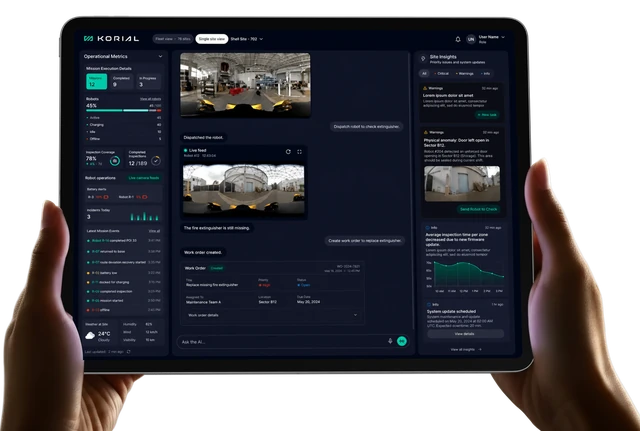
We connect fixed cameras, drones, and robots to track an event across different views when one camera cannot capture the full story. Our system follows vehicles and objects between cameras and gives operators a single timeline for each event, as we did for Korial’s mixed fleets.

Equipment and Anomaly Monitoring icon

Equipment and Anomaly Monitoring

Our experts build video and thermal analytics to monitor machines as well as people, detecting leaks, hotspots, jams, and abnormal movement against each asset’s normal behavior. When an issue is flagged, the system attaches the relevant footage so technicians can review and confirm it.

Video Authenticity and Media Analysis icon

Video Authenticity and Media Analysis

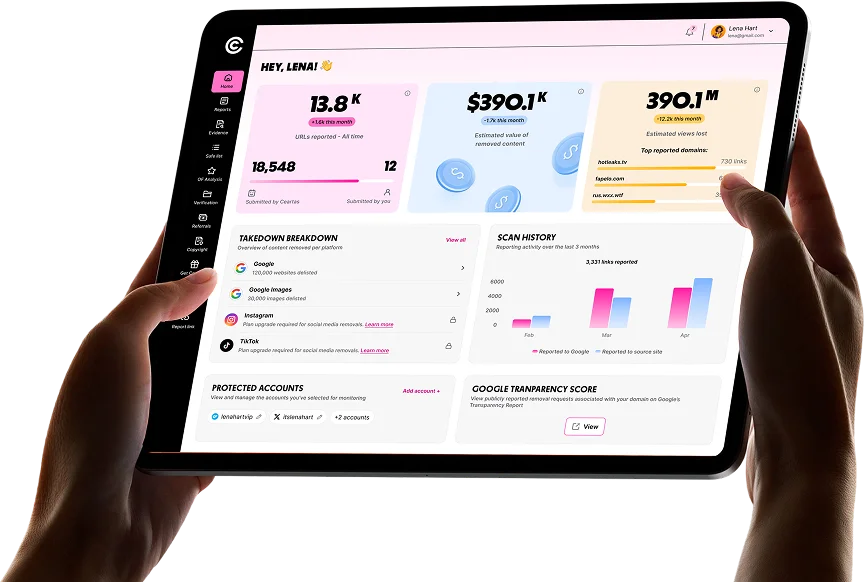
We build video analysis systems that check footage for signs of manipulation over time, such as lips falling out of sync with speech, suspected deepfakes, and reused footage. The system flags suspicious content for human review, as we did for Ceartas’s platform.

Video Search and Event Review icon

Video Search and Event Review

Our approach makes recorded footage searchable instead of leaving teams to watch hours of video manually. We index events, objects, and activities, then use vision-language models to enable plain-language searches for example, finding every forklift near the loading bay last Tuesday.

How We Scope a Video Analytics Request icon

How We Scope a Video Analytics Request

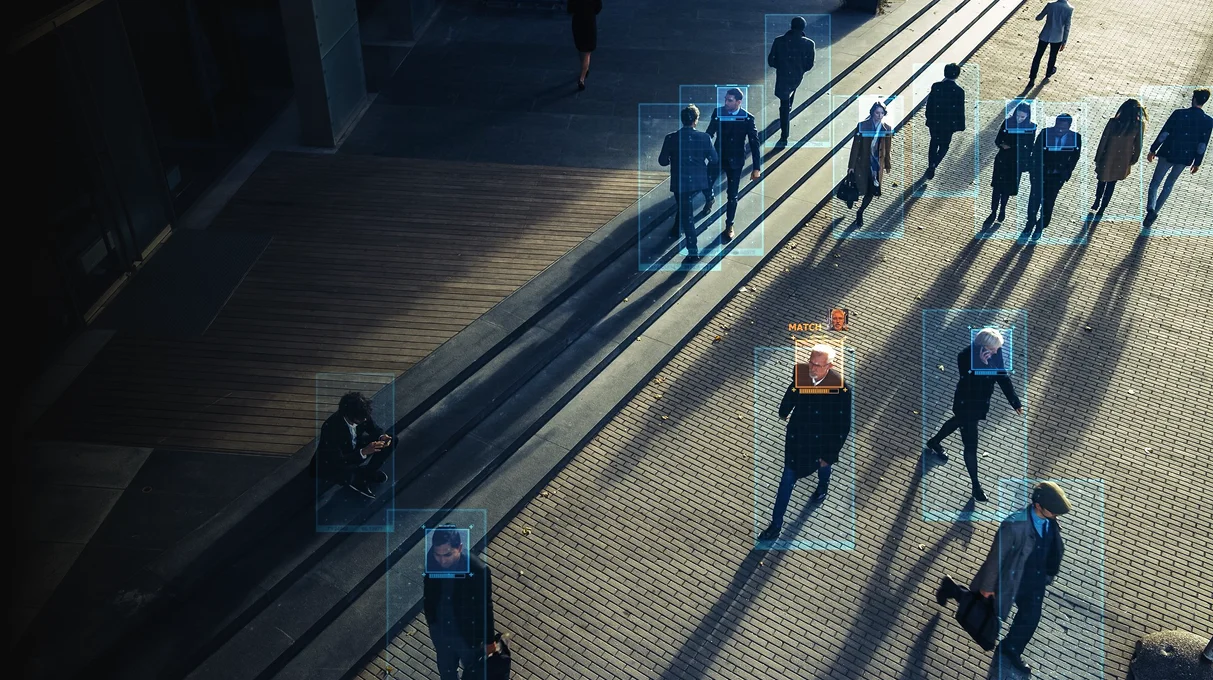
We first classify the request into one of six event types because that choice affects the cameras, frame strategy, and overall cost. Before quoting, we define what the system needs to detect and design the analytics around what happened, rather than identifying who was there.

How We Scope a Video Analytics Request

We first classify the request into one of six event types because that choice affects the cameras, frame strategy, and overall cost. Before quoting, we define what the system needs to detect and design the analytics around what happened, rather than identifying who was there. Since 2 February 2025, the EU AI Act has prohibited real-time remote biometric identification in publicly accessible spaces for law enforcement, with narrow exceptions, which is one reason identity is never assumed in scope.

Event type
Example
What it needs
Presence in a zone
"Alert when anyone enters the loading bay after hours"
Zone rules, often event-triggered
Rule breach
"Flag workers without hard hats"
Object detection on frames sampled every few seconds
Sequence of actions
"Was the safety check done before start-up?"
Activity recognition on continuous frames
Equipment anomaly
"Flag a hotspot on this pump"
Thermal or visual baselines per asset
Journey across cameras
"Where did this forklift go?"
Tracking and re-identification of objects between cameras
Who a person is
"Identify this visitor"
Not a default build: legal review and a lawful basis first

AI Process Automation We Have Built

Both projects automate work where volume outpaces people and every error carries a cost.

Korial: One AI Layer Across Many Vendors' Hardware

Industrial sites run robots, drones, and fixed sensors from different manufacturers, each with its own software, so inspections could not be managed from one place and every new device meant rebuilding workflows. MindInventory engineered Korial's hardware-agnostic intelligence layer, which translates each device type's capabilities and telemetry into one shared model, so new vendors join without touching existing workflows. Missions are tested in an Unreal Engine 5 digital twin of the site before they run on live equipment, and every AI directive traces back to the telemetry behind it. Korial's platform serves energy and chemical operators, including Shell, BP, and Evonik.

Outcomes:

28%Inspection costs reduced by
40,000+human inspection hours saved
1M+autonomous inspections completed
Read the Case Study

Ceartas: Content Protection Automated at Web Scale

Protecting a creator's content means finding each copy, confirming it, and filing a notice, one case at a time. Ceartas runs that process across the web: scanning continuously, flagging leaks and impersonators with lightweight AI models, sending each case to a human specialist, then enforcing through DMCA and other legal frameworks. MindInventory's dedicated team modernized the live platform without pausing monitoring. The figures are Ceartas's reported platform results.

Outcomes:

$6M+in stolen content removed in 10 weeks
600,000+unauthorized images and videos removed
75 millionsites and 2,000+ platforms monitored
Read Case Study

Cameras Recording Hours Nobody Watches?

Tell MindInventory which events matter and which cameras cover them. In two weeks, free of charge, you get a written plan with the events to detect, where to process the video, the cost per camera, and a fixed estimate. If your video system’s built-in analytics already cover it, the plan says so.

Stalled AI Video Analytics

What AI Video Analytics Changes for Your Team

MindInventory’s video analytics takes the watching off your team, so people spend their time responding to events instead of searching footage for them.
Where You Are Now
Where You Are After Launch
Hundreds of cameras record, and nobody watches most of them.
Every feed is analyzed, and people see only the events.
Our analytics pilot raised so many false alarms that staff muted it.
Each event type runs within an agreed false-alarm budget.
We find out about safety breaches from incident reports.
Supervisors get an alert with the clip within seconds.
Finding one event in recorded footage takes hours.
A search returns the matching clips in moments.
Drone, robot, and fixed-camera footage sit in separate systems.
All feeds land in one timeline per site.

The MindInventory Alert Budget

Video analytics fails when people stop trusting the alerts. Every MindInventory video system starts with an Alert Budget for each event type, agreed before go-live and tested on your recorded footage.
Budget item
What we agree with you
What goes wrong without it
Events that matter
The exact events to detect, ranked by consequence
The system flags everything and nothing stands out
Missed-event limit
How many real events may be missed per hundred
Serious events slip through unnoticed
False-alarm limit
Maximum false alerts per camera per day
Staff mute the alerts within a week
Time to alert
Seconds from event to notification
Alerts arrive after the moment to act has passed
Who receives it
The person or team, the channel, and what the alert includes
Alerts land in an inbox nobody owns
Review loop
Every alert confirmed or dismissed, and fed back
Accuracy never improves after launch

Video Alerts Your Team Has Started Ignoring?

A video analytics system people ignore usually has no agreed alert limits, not a weak model. MindInventory reviews your system in five working days, free, against the Alert Budget, and sends a findings document naming what is causing the noise or the misses and what fixing it takes.

Stalled AI Video Analytics

Our Video Analytics Development Process

MindInventory builds AI video analytics in seven stages, from a camera survey to live validation against the Alert Budget, so the alerts your team receives are ones it can act on. One site or use case typically goes live in 8 to 14 weeks.

  1. Step 1

    Camera and Site Survey

    We inventory cameras, angles, lighting, network, and how your video management system shares video, through RTSP, ONVIF, Milestone, or Genetec, with a privacy review.

    You receive: a camera survey and a privacy assessment

    Typical time: about 1 week

    Moves on when: every target event has a camera that can see it

  2. Step 2

    Event Definition and Alert Budget

    We define each event precisely and agree its missed-event limit, false alarms per camera per day, time to alert, and recipient.

    You receive: signed event definitions and Alert Budgets

    Typical time: about 1 week

    Moves on when: the people who will receive the alerts agree the budgets

  3. Step 3

    Footage Collection and Temporal Annotation

    We mark when each real event starts and ends in historical footage, and add staged or synthetic footage for rare events such as falls or fires.

    You receive: an annotated footage library

    Typical time: 2 to 3 weeks

    Moves on when: every event type has enough labeled examples

  4. Step 4

    Video Pipeline and Model Development

    We build decoding, the frame strategy per camera, detection, multi-object tracking, activity recognition, zone rules, and cross-camera tracking.

    You receive: a pipeline tested on recorded footage

    Typical time: 3 to 4 weeks

    Moves on when: recorded-footage results meet the Alert Budget

  5. Step 5

    Edge or Cloud Deployment and Alert Routing

    We deploy on NVIDIA Jetson or in the cloud, route alerts with clip, camera, and time to your team's tools, and apply privacy masking.

    You receive: live analytics with alerts and dashboard

    Typical time: 2 to 3 weeks

    Moves on when: alerts reach the right people within the time-to-alert target

  6. Step 6

    Live Validation Against the Alert Budget

    Reviewers confirm or dismiss every live alert, and we tune thresholds camera by camera until each event type stays inside its budget.

    You receive: a validation report per event type

    Typical time: about 2 weeks

    Moves on when: every event type meets its budget for two consecutive weeks

  7. Step 7

    Monitoring and Retraining

    We watch accuracy per camera and signs that a camera has moved or a scene has changed, and retrain from reviewed clips.

    You receive: monitoring dashboards and full handover

    Typical time: ongoing

    Moves on when: handover is signed off

How Much Do AI Video Analytics Solutions Cost?

MindInventory prices AI video analytics in stages, from under $25,000 for a proof of concept to $150,000 for production analytics across several sites, so you see alerts on your own footage before the larger build. Four things move your number: how many camera streams you analyze, how often frames must be checked, whether processing runs on site or in the cloud, and how many event types the system learns. Running cost is mostly compute per stream, which smart frame sampling keeps low. Plan for 15 to 20% of build cost each year for monitoring and retraining.
Stage
What it covers
Cost
Timeline
Proof of concept
One or two event types tested on recorded footage from your cameras
Under $25,000
6 to 10 weeks
Focused deployment
One site or use case live, with alerts, dashboard, and review loop
$25,000 to $60,000
8 to 14 weeks
Production analytics
Several sites or camera fleets, edge devices, and retraining pipelines
$60,000 to $150,000
4 to 8 months

What Each Camera Costs to Analyze

The running cost of AI video analytics depends mostly on how many frames each camera sends for analysis, because compute scales with frames analyzed. One camera at 30 frames per second produces 2,592,000 frames a day, and analyzing every one is the most common way to overspend. Sampling one frame every 10 seconds cuts that to 8,640, so 100 cameras drop from about 259 million frames a day to 864,000. MindInventory gives each camera the cheapest frame strategy that still catches its events inside the Alert Budget.
Frame strategy for one camera
Frames analyzed per day
Compared with every frame
Every frame at 30 frames per second
2,592,000
1x
Downsampled to 10 frames per second
864,000
3x fewer
One frame every 2 seconds
43,200
60x fewer
One frame every 10 seconds
8,640
300x fewer
10 frames per second, only during 2 hours of triggered activity
72,000
36x fewer

How Long Does It Take to Deploy AI Video Analytics?

A proof of concept takes 6 to 10 weeks, and one site in production takes 8 to 14 weeks. Several sites take 4 to 8 months. Access to footage and to the cameras themselves usually sets the pace, not the models. The seven stages are set out in Our Video Analytics Development Process above.

 Blue gradient background

Know What Your Video Analytics Will Cost

Tell us how many cameras you have, the events you care about, and where the footage is stored. Within two weeks MindInventory returns a fixed estimate, the running cost per camera, and a written recommendation, free of charge.

Get my fixed estimate

The Video Analytics Stack We Build On

MindInventory chooses the video stack per site, starting from the cameras and video systems you already run and adding only the processing each event needs. Ingestion, models, and alerting stay separate, so a better model can be swapped in without touching your cameras.

Video ingestion and VMS
RTSP ONVIF Milestone XProtect Genetec GStreamer FFmpeg
Video AI pipelines
NVIDIA DeepStream OpenVINO Roboflow Inference OpenCV Roboflow
Computer vision
YOLO Detectron2 Segment Anything
Multi-object tracking
ByteTrack BoT-SORT DeepSORT
Activity recognition
MMAction2 PyTorchVideo VideoMAE SlowFast
Vision-language models
Gemini GPT Qwen families (for video search and summaries)
Edge hardware
NVIDIA Jetson Hailo Google Coral
Managed video services
Amazon Rekognition Video Google Cloud Video Intelligence Azure AI Video Indexer
Streaming and storage
Apache Kafka Amazon Kinesis Video Streams
Cloud and MLOps
AWS SageMaker & Bedrock Vertex AI Azure AI Foundry MLflow Kubernetes

AI Video Analytics We Build for Real-World Monitoring

MindInventory builds AI video analytics systems that analyze live or recorded video to detect events, track activity, identify anomalies, and flag situations that need attention. We connect video intelligence to operational workflows so teams can monitor activity at scale without manually reviewing hours of footage.

We apply video analytics to footage from robots, drones, and fixed cameras to support remote inspections, identify anomalies, and flag potential equipment or site issues. This complements our work on Korial’s industrial digital twin capabilities.
For Ceartas, we developed AI-powered workflows to help detect copied or manipulated content at web scale and support review and enforcement.
We build systems that monitor PPE compliance, restricted-zone access, and worker proximity to heavy equipment, helping site teams identify safety risks.
We apply video analytics to check process steps, flag forklift near-misses, monitor production lines, and detect stoppages or workflow deviations.
We analyze footfall, queue lengths, and occupancy patterns to help teams manage staffing and space utilization, with privacy-conscious approaches that avoid identifying individuals where identification is unnecessary.
We build systems that monitor dock and yard activity, vehicle movement, loading operations, and potential delays to improve operational visibility.

Frame Sampling, Event-Triggered, or Continuous Processing?

MindInventory decides how often to analyze video by what each event needs, because analyzing every frame of every camera rarely pays. Most sites mix all three.
Measure
Frame sampling
Event-triggered
Continuous processing
How it works
Analyze one frame every few seconds
Motion or a sensor wakes full analysis
Analyze every frame in real time
Best when
Conditions change slowly: occupancy, queues, shelves
Events are rare: intrusions, after-hours activity
Seconds matter: falls, collisions, fast processes
Cost per camera
Lowest
Low most of the time
Highest
Watch out for
Short events between samples are missed
A weak trigger misses events entirely
Compute cost multiplies with every camera

Why Choose MindInventory as Your AI Video Analytics Company

MindInventory has built software since 2011, and its 70+ AI engineers, data scientists, and MLOps specialists work inside a 300+ person engineering organization that builds the cloud, edge, and app layers video analytics depends on.
Built on your cameras

Built on your cameras

We connect to the cameras and video systems you already run before suggesting new hardware.

Alerts with limits

Alerts with limits

Every event type runs within an agreed Alert Budget.

Privacy designed in

Privacy designed in

Identity is not tracked unless the use case truly needs it and the law allows it.

You keep everything

You keep everything

Models, pipelines, and dashboards transfer at handover.

Plan Your Video Analytics, or Fix One That Stalled

Starting fresh? MindInventory assesses one use case in two weeks and returns a plan with a fixed estimate. Already have video analytics your team ignores? We review it in five working days and tell you why. Both are free.

A developer seen from behind working on a laptop and a second monitor full of code

AI Video Analytics FAQs

Explore answers to common questions about AI Video Analytics

Usually, yes. Most IP cameras stream over RTSP or ONVIF, and systems such as Milestone and Genetec can pass video and events to an external analytics service. MindInventory reviews sample footage from your cameras in the first week and recommends new hardware only where resolution, angle, or lighting cannot capture the event.

It depends mostly on how often frames are analyzed and where. A camera checked every few seconds on a shared edge device costs a fraction of one analyzed continuously in the cloud. MindInventory estimates running cost per camera per month during the assessment, so the business case covers operating cost as well as the build.

On site when seconds matter, bandwidth is limited, or footage must not leave the premises. In the cloud when volumes vary, models are heavy, or sites are small. Many deployments do both: an edge device filters the stream on site and sends only events and short clips to the cloud for review, search, and retraining.

Not by default. Most safety and operations use cases need to know what happened, not who was there, so MindInventory designs systems that count and track without identifying people. Where identity is genuinely required, it needs a lawful basis and, often, consent. The EU AI Act restricts real-time biometric identification in public spaces. This is a general description, not legal advice.

By keeping as little as the task needs. MindInventory blurs faces and plates where identity is not needed, processes video on site where possible, and stores only event clips rather than full recordings when that is enough. Retention periods, access rights, and audit logs are agreed with your privacy and security teams before go-live.

Typically within seconds of the event when video is processed on site or close to the camera. Cloud processing adds network time, which suits events where minutes are acceptable. MindInventory sets the time-to-alert target for each event type as part of the Alert Budget and tests it on live feeds before launch.

Yes. MindInventory indexes recorded footage by events, objects, and activity, then adds a vision-language model so supervisors can type a question and get matching clips with timestamps. Search runs on footage you already store, within your existing access rights, so investigations that took hours take minutes.

Enough real examples of each event, which matters more than total hours. Common events need a few hundred labeled clips; rare ones, such as a fall or a fire, are supplemented with staged recordings and synthetic footage. MindInventory starts from pretrained models, so most projects need far less footage than teams expect.

Yes, if it is trained and tested for those conditions. MindInventory includes night, weather, glare, and thermal footage in testing, and sets separate accuracy targets where conditions differ. Thermal cameras are often better for detecting heat, smoke, and people in darkness, and models are trained on that footage.

Through the review loop. Every alert is confirmed or dismissed by your team, and MindInventory tracks missed events and false alarms against the Alert Budget, camera by camera. When accuracy drifts, for example after a layout change, reviewed clips retrain the model, which is retested before it replaces the current one.

Video analytics may not be the right fit when the event can be detected more reliably through an existing system, sensor, access log, or barcode. It is also a poor fit when cameras cannot clearly capture the event or no one is responsible for acting on alerts. If you only need to identify or inspect a single image, consider Computer Vision Development instead.
Looking for other Services?

Explore our other related services to enhance the performance of your digital product

AI insights from our engineering team
Written by the people doing the work, for the questions that come up before a project starts.
post
How to Build an LLM? Definition, Use Cases, and Steps

Developing your enterprise-grade AI solution and need to make it live faster? Let’s opt for ready-to-integrate, general-purpose LLMs! But wait, are you ready to tackle challenges generic LLMs create, like…