








AI Integration Services

Add AI to the systems your business already runs, without replacing them. MindInventory integrated OraQ’s dental AI into five practice management systems, with case acceptance of up to 70% against an industry norm of 30 to 40%, and engineered Korial’s AI layer over robots, drones, and sensors from many vendors, with inspection costs down 28%. Let’s scope your AI integration.

Trusted by Fast-Growing Startups to Established Enterprises

Week 2

A written integration plan which systems the AI reads from and writes to, how, and at what cost

Before the build

A readiness check of every system involved, so API gaps surface before they become delays

At launch

AI that works inside your current tools, with your existing logins and permissions

At handover

All integration code, connectors, and documentation, owned by you

70+

AI and ML specialists

300+

Engineering specialists

2700+

Projects delivered

1800+

Clients served

15+

Years in business

ISO 42001: 2023

ISO 42001: 2023

ISO 27001: 2022

ISO 27001: 2022

ISO 9001: 2015

ISO 9001: 2015

SOC2 Type II

SOC2 Type II

HIPAA

HIPAA

GDPR

GDPR

AI Integration Services for Your Existing Systems

AI integration connects an AI model to the software your business already runs, so it can read the right data, act inside existing workflows, and respect the permissions already in place. MindInventory’s 70+ AI engineers, data scientists, and MLOps specialists deliver it as four services, from AI integration consulting on one system to production integrations across many.

How We Scope an AI Integration Request

Every integration request is one of six jobs, and each needs a different depth of access. MindInventory sorts yours before quoting. If your vendor’s built-in AI already does the job, buy that instead.
The job
Example request
What it needs
Read and answer
"Summarize this patient's last three visits"
Read access under the user's own permissions
Draft for approval
"Draft the appeal letter for this denied claim"
A draft in a review queue, never in the record
Write back
"Code this invoice and post it to NetSuite"
API write access, validation, and retry-safe writes
React to events
"When an order is delayed, tell the customer"
An event feed, a queue, and a fallback
Work in a chat app
"Let field staff check stock from WhatsApp"
The platform's business API, mapped to your users
Run a whole workflow
"Process every new claim end to end"
More than an integration: process automation or an agent

AI Integrations We Have Built

These two projects show the two ways AI integration pays off: inside a system of record your users cannot leave, and across many systems that have to act as one.

OraQ: Dental AI Inside Five Practice Management Systems

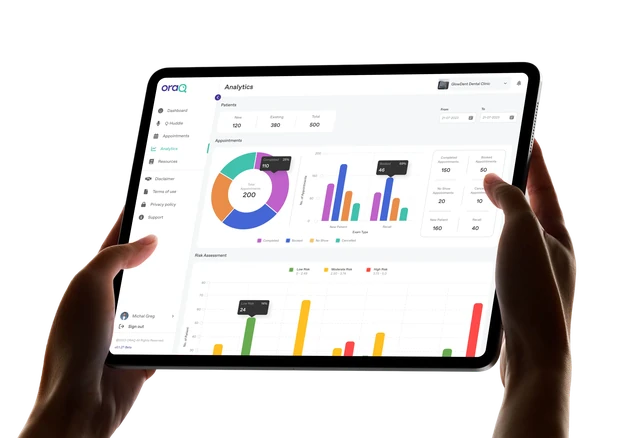
Dental exams vary by clinician, and patients accept treatment more readily when they can see the reasoning. Practices also run on different practice management systems, each needing its own data connection. MindInventory has worked with OraQ as a dedicated team since 2022, building the risk-scoring models, the digital odontogram and periodontal charting, and integrations into the practice management systems clinics already run: Dentrix, Open Dental, ClearDent, Curve, and Eaglesoft. Dentists get AI-supported treatment planning without leaving the software they use all day. The figures below are OraQ's reported results.

Outcomes:

70%Up to Case acceptance, against an industry norm of 30 to 40%
$250-$330of additional identified treatment per exam
5major practice management systems
Read the Case Study

Korial: One AI Layer Across Many Vendors' Hardware

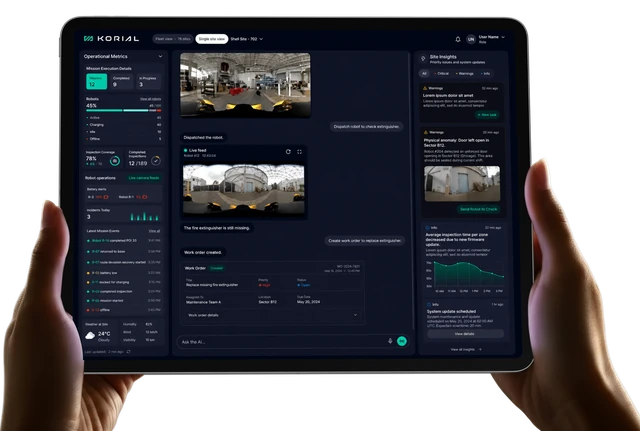
Industrial sites run robots, drones, and fixed sensors from different manufacturers, each with its own software, so inspections could not be managed from one place and every new device meant rebuilding workflows. MindInventory engineered Korial's hardware-agnostic intelligence layer, which translates each device type's capabilities and telemetry into one shared model, so new vendors join without touching existing workflows. Missions are tested in an Unreal Engine 5 digital twin of the site before they run on live equipment, and every AI directive traces back to the telemetry behind it. Korial's platform serves energy and chemical operators, including Shell, BP, and Evonik.

Outcomes:

28%Inspection costs reduced by
40,000+human inspection hours saved
1M+autonomous inspections completed
Read the Case Study

Want AI Inside a System You Can't Replace?

Tell MindInventory which systems the AI needs to work with. In two weeks, free of charge, you get a written integration plan, the integration approach for each system, and a fixed estimate. If a vendor’s built-in AI already covers the need, the plan says so.

Robot thinking about network dashboard

What You Get With MindInventory AI Integration

MindInventory’s AI integrations put the AI where your team already works, using the data and permissions already in your systems, so nobody switches tools to use it.
Where you are now
Where you are after launch
Our AI pilot works in a demo but is not connected to anything real.
The AI reads live data from your systems and writes results back where your team works.
We were told we need to replace our ERP or EHR to use AI.
The AI connects to the systems you have, through their published APIs.
Staff copy data between the AI tool and our core system by hand.
Results land in the system of record automatically, with the same validation a person's entry gets.
If the AI vendor has an outage, we don't know what breaks.
Every AI call has a timeout and a fallback, so outages degrade one feature instead of the whole system.
Nobody can tell which records the AI changed.
Every call is logged with its prompt version, context sources, and model, so any answer can be traced months later.

The MindInventory Integration Readiness Check

Every MindInventory integration starts with the Integration Readiness Check: six checks run on each system the AI will touch, before any build starts. It is where most hidden cost surfaces, and it is the reason our estimates hold.

Check 01

Access path

What we confirm

An API, connector, or data feed exists for every read and write the AI needs

What goes wrong if it is skipped

The build stalls waiting on an interface nobody owns

Check 02

Identity and permissions

What we confirm

The AI can act under each user's existing permissions, not a shared admin account

What goes wrong if it is skipped

The AI shows or changes data a user should not reach

Check 03

Data contracts

What we confirm

Field formats, codes, and required values are documented for every exchange

What goes wrong if it is skipped

Writes fail validation, or worse, pass it with wrong values

Check 04

Limits and latency

What we confirm

Rate limits, quotas, and response times fit the expected volume

What goes wrong if it is skipped

The feature slows down or breaks at peak usage

Check 05

Failure handling

What we confirm

Timeouts, retries, and fallbacks are defined for every call

What goes wrong if it is skipped

One slow response freezes a screen or a batch job

Check 06

Audit trail

What we confirm

Every AI read and write can be logged and traced

What goes wrong if it is skipped

Nobody can explain or reverse what the AI changed

Why AI Integrations Stall Before Production

Most AI integrations stall on access, not on the model. MindInventory traces each stall to one of six causes, listed in the order they surface, and catches each one with a Readiness Check before the build.
What you see
Why it happens
How we fix it
The project waits weeks on IT or the vendor
No approved access path
Vendor approval starts in week one
Users see data they should not
One shared service account
Per-user tokens and scopes
Writes fail, or save wrong values
Codes differ between systems
Signed field mappings
Fine in testing, slow at month end
Limits sized for the demo
Queues, caching, and budgets
Duplicate records after a timeout
Retries resend saved writes
An idempotency key on every write
It breaks after a vendor update
An untested API change
Contract tests and pinned versions

Is Your AI Project Stuck at the Integration Step?

Many AI pilots work on their own and stall when they meet real systems. MindInventory reviews your project in five working days, free: what it connects to, where data access is blocked, and what is missing for production. The findings document names each gap and what fixing it takes.

Robot thinking about network dashboard

The MindInventory Write-Back Ladder

MindInventory starts every AI integration at read-only access, with its own credentials and no shared admin account. An action moves up one of four rungs only after shadow-mode results show it is safe to. Clinical notes and financial entries never go past Draft, so no chart or ledger changes without a person.
Rung
What the AI may do
Typical actions
What it needs
1. Read only
Read data under the user's own permissions; write nothing
Visit summaries, account lookups
Every read is logged
2. Draft
Write to a review queue, never to the record
Clinical notes, appeal letters, journal entries
A person approves each draft
3. Write with validation
Write through the system's API and its validation rules
Tags, routing, CRM fields, ticket categories
Spot checks; every write logged and reversible
4. Write and notify
Write, then tell the record owner what changed
Status updates, low-value reorders
A weekly audit of a sample

Our AI Integration Process

MindInventory integrates AI into existing systems in six stages, from the Integration Readiness Check to a monitored, phased rollout. A focused integration into one system of record typically takes 8 to 14 weeks, and nothing writes to a live system before it has run in shadow mode on real data.

  1. Step 1

    Integration Readiness Check

    We run the six readiness checks on every system the AI will touch.

    You receive: a readiness report per system and an API gap list

    Typical time: about 1 week

    Moves on when: every required read and write has a confirmed access path

  2. Step 2

    Integration Architecture and Data Contracts

    We choose the pattern, map fields such as FHIR resources or ERP objects, and start vendor approvals.

    You receive: an architecture document, signed data contracts, and a fixed estimate

    Typical time: 1 to 2 weeks

    Moves on when: system owners sign off the contracts

  3. Step 3

    Sandbox Proof of Concept

    We connect one AI feature end to end in the vendor's sandbox and measure latency, accuracy, and rate-limit behavior.

    You receive: a working proof of concept and measured results

    Typical time: 2 to 3 weeks

    Moves on when: the feature meets its latency and rate-limit targets

  4. Step 4

    Integration Layer Build and Failure Testing

    We build the AI gateway with timeouts, fallbacks, queues, and metering, then fault-test every provider failure.

    You receive: the integration layer with its test suite

    Typical time: 3 to 4 weeks

    Moves on when: every failure mode has a tested fallback

  5. Step 5

    Shadow Mode on Live Data

    Shadow mode before write mode, every time: writes are logged, not committed, and your team checks the results.

    You receive: a shadow-mode comparison report

    Typical time: 1 to 2 weeks

    Moves on when: results meet the agreed quality bar

  6. Step 6

    Phased Rollout and Monitoring

    We release behind feature flags, one team at a time, with dashboards for latency, errors, and cost per call.

    You receive: dashboards, a runbook, and full handover of code and pipelines

    Typical time: launch in 1 week, then ongoing

    Moves on when: handover is signed off

How Much Does AI Integration Cost?

AI integration at MindInventory runs from under $25,000 for a proof of concept to $150,000 for a production integration across several systems, priced in stages so you prove the connection works before committing to the larger build.

Stage
Proof of concept
Focused integration
Production integration
What we confirm
One AI feature connected to one system, tested on real data
One system of record or one product feature, in production with fallbacks and logging
Several systems, shared integration layer, permissions across them, monitoring
Cost
Under $25,000
$25,000 to $60,000
$60,000 to $150,000
Timeline
6 to 10 weeks
8 to 14 weeks
4 to 8 months

How Long Does It Take to Integrate AI into Existing Systems?

A proof of concept on one system takes 6 to 10 weeks, and a focused integration into one system of record takes 8 to 14 weeks. Integrating across several systems takes 4 to 8 months. The schedule is usually set by API access and vendor approvals, not by the AI model.

 Blue gradient background

Know What Your AI Integration Will Cost

List the systems involved and what the AI should do in them. Within two weeks MindInventory returns a fixed estimate, the integration approach per system, and a written recommendation, free of charge.

Get my fixed estimate

The AI Integration Stack We Build On

MindInventory builds every AI integration on the interfaces your systems already support, then adds one integration layer that handles models, permissions, retries, and logging in one place. Through our AI consulting services, we help determine the right integration architecture and technology approach for each use case. Your systems of record stay as they are, and the AI provider behind the layer can change without touching them.

Model gateways
LiteLLM Portkey OpenRouter
Tools and interoperability
MCP function calling RBAC structured output
APIs and events
REST GraphQL webhooks Kafka RabbitMQ Amazon EventBridge
Middleware and iPaaS
MuleSoft Boomi Azure Logic Apps n8n
Healthcare standards
FHIR SMART on FHIR HL7 v2 Mirth Connect
Business systems
SAP Oracle NetSuite Microsoft Dynamics Salesforce
Messaging channels
Slack Microsoft Teams WhatsApp Business Platform
Identity and access
OAuth 2.0 OpenID Connect SAML Okta Microsoft Entra ID
Frontier models
Claude GPT Gemini Grok
Open-weight models
Llama Mistral DeepSeek Qwen Gemma Phi
Observability
Langfuse Arize Phoenix Helicone OpenTelemetry Datadog
Cloud and MLOps
AWS SageMaker & Bedrock Vertex AI Azure AI Foundry MLflow Kubernetes

AI Integrations We Build Into Existing Business Systems

MindInventory integrates AI with the systems your business already relies on, so you can add intelligent capabilities without replacing your EHR, CRM, ERP, practice-management, or operational platforms. We connect AI to the right data and APIs, enforce existing access and approval rules, and write results back into the workflows where teams already work.
Industry
How we integrate AI
Healthcare and dental
For OraQ, we integrated AI capabilities into dental practice-management workflows. We also connect AI with EHRs through standards such as FHIR and HL7 v2 to support clinical and operational workflows.
SaaS and software products
We integrate AI directly into your product so every customer can use AI features with appropriate tenant-level data separation, access controls, and usage metering.
Financial services and fintech
We connect AI to CRMs, core platforms, and document systems so AI-generated results can move through existing approval rules and business workflows.
Logistics and e-commerce
We integrate AI with ERPs, storefronts, and carrier systems to support order routing, forecasting, and exception handling without disrupting existing operations.
Energy, manufacturing, and field operations
We connect AI with robots, sensors, maintenance, and inspection systems, including our work on Korial, and deliver relevant outputs through the messaging tools field teams already use.

API Layer, Embedded, or Middleware Integration?

MindInventory chooses the integration pattern by how much the AI must act inside a system versus alongside it. Most first projects start with an API layer, move to embedded once users want AI in their main screen, and add middleware only when several systems must share one AI.
Engagement
API layer
Embedded in the application
Middleware
How it works
AI runs as a separate service your system calls
AI appears inside the screens of an existing system
A shared layer connects several systems to one AI service
Best when
One system, a clear request and response
Users must act on AI output without switching screens
Several systems need the same AI, or none has a usable API
Watch out for
Users switching tabs if results are not surfaced in their main tool
Vendor approval and release cycles of the host system
One more component to run and monitor
Build and upkeep
Lowest
Moderate, tied to the host system's update schedule
Highest, but reused by every later integration

When AI Integration isn’t the right fit for you?

Do you need to build the AI itself first? If the AI capability does not exist yet and needs to be developed before it can be connected to your existing systems, consider: AI development services

Do you want to automate a process end to end? If the goal is to move a multi-step workflow forward with minimal human intervention rather than simply add AI to an existing system, consider: AI process automation

Do you want AI to plan and act across multiple tools? If the system needs to decide what to do, use different tools, and complete tasks on its own, consider: AI agent development

It is also not the right fit if

  • Your vendor's built-in AI feature already covers the need
  • A no-code connector already moves the data you need, reliably
  • Nobody owns the system the AI must write to
  • You want the cheapest build on a three-week timeline, with no readiness check
  • Nobody owns a business metric the integration is meant to move

Why Businesses Choose MindInventory for AI Integration

MindInventory has built software since 2011, and its 70+ AI engineers, data scientists, and MLOps specialists work inside a 300+ person engineering organization that has spent fifteen years connecting systems.
We integrate without replacing.

We integrate without replacing.

The AI connects to the EHR, ERP, or product you have, through its own APIs.

We design for failure first.

We design for failure first.

Timeouts, fallbacks, and audit logs are in the plan before the first AI call is written.

Permissions stay where they are.

Permissions stay where they are.

The AI acts as the user, never as a shared admin account.

You keep everything.

You keep everything.

Integration code, connectors, and documentation transfer at handover.

Plan Your Integration, or Rescue a Stalled One

Starting fresh? MindInventory assesses one integration in two weeks and returns a plan with a fixed estimate. Already have an AI project that won’t connect? We review it in five working days and tell you what is missing. Both are free.

A developer seen from behind working on a laptop and a second monitor full of code

AI Integration FAQs

No. MindInventory connects AI to the systems you already run, through their published APIs, connectors, or data feeds. The system of record stays in place, keeps its rules, and remains the single source of truth. Replacement only becomes worth discussing when a system has no supported way to read or write data at all, and even then a middleware layer is usually cheaper.

Not if it is designed correctly. MindInventory runs AI calls asynchronously wherever the user does not need the answer instantly, caps every call with a timeout, and queues heavy work instead of running it inside a page load. Your system’s core screens and transactions never wait on an AI response they do not need.

Your system keeps working. Every AI call on a MindInventory integration has a timeout and a defined fallback: retry, switch to a second provider, show the screen without the AI suggestion, or queue the request for later. The fallback for each feature is agreed during the readiness check, so an outage degrades one feature rather than stopping work.

Through the EHR’s supported interfaces. For Epic and most modern EHRs that means FHIR APIs and SMART on FHIR app launch, listed and approved through the vendor’s developer marketplace. Many hospitals also run HL7 v2 feeds for real-time events such as admissions and results. Vendor approval often sets the timeline, so MindInventory starts that process in the first weeks.

Yes, through the same rules a person’s entry goes through. MindInventory sends AI writes through the system’s API so its validation applies, makes each write safe to retry without duplicating records, and logs who, what, and when. For consequential changes, such as a clinical note or a financial entry, the AI drafts and a person approves before anything is saved.

Only what each request needs. MindInventory sends the minimum fields for the task, redacts or masks personal data where the task allows, and uses provider agreements that exclude your data from model training, with BAAs where health data is involved. Where data must not leave your environment, the model runs in your own cloud account or on your servers instead.

Yes. Open-weight models can run on your own servers, with the integration layer inside your network and no outbound calls. For hybrid setups, a secure connector inside your network sends only approved, minimized data to a cloud model. The trade-off is that you take on GPU capacity planning and model updates, which MindInventory sizes during the readiness check.

By managing usage in the integration layer rather than in each feature. MindInventory queues and batches requests that do not need an instant answer, caches repeated results, sets per-customer and per-feature budgets, and alerts before a limit is reached. Cost per feature is visible from launch, so growth in usage never arrives as a surprise invoice.

Yes. Each platform offers a business API for bots and apps, and MindInventory connects them to your AI service and your systems of record. It is often the fastest route to adoption, because people already have the app open. The integration layer keeps permissions and logging the same as in your main product, so a request through Slack or WhatsApp follows the same rules as one in your app.

In stages. MindInventory tests against the vendor’s sandbox first, then runs the integration in shadow mode on live data: the AI produces its results and logs them, but writes nothing. Your team compares those results with what actually happened. The integration starts writing only after the shadow results meet the agreed quality bar.
Looking for other Services?

Explore our other related services to enhance the performance of your digital product

AI Development Services

The full build practice, with cost bands, delivery process and production case studies.

AI Process Automation

Lorem Ipsum is simply dummy text of the printing and typesetting industry.

AI Agent Development

Build intelligent AI agents that automate tasks, make decisions, and improve workflows.

RAG Development

When answers must be grounded in your own documents and cite them.

AI insights from our engineering team
Written by the people doing the work, for the questions that come up before a project starts.
post
How to Build an LLM? Definition, Use Cases, and Steps

Developing your enterprise-grade AI solution and need to make it live faster? Let’s opt for ready-to-integrate, general-purpose LLMs! But wait, are you ready to tackle challenges generic LLMs create, like…